For the last two weeks, I’ve prepared all my materials exclusively in Anthropic’s office suite. I write a text, want to verify a figure, rephrase a paragraph. I highlight it and tell Claude. I have it rework a table. I bring it into an internal call, and we all work together on a whiteboard. How does it work?
On November 10, at The Briefing: Work at the Frontier in San Francisco, Anthropic introduced a whole batch of tools: Claude Sheets spreadsheets, Claude Whiteboards for digital whiteboarding, Claude Data dashboards, full partner apps inside Claude, and Claude Meetings, an assistant for meetings. Head of Product Ami Vora summed it up by saying that for years we adapted to software, and now Claude will adapt to us. Two days later, a package for manufacturing companies followed.
Add October, when Anthropic released into production documents, presentations, and Design, and within two months Claude has an almost complete office: documents, presentations, spreadsheets, whiteboards, data dashboards, animations, and meetings.
How does it work? Actually, quite similarly to Google Workspace. In the desktop client or the web interface, you click the Artifacts tab and either pick an Artifact you’re already working on or create a new one. This is slightly confusing: you have to remember that Anthropic simply calls these interactive elements artifacts.
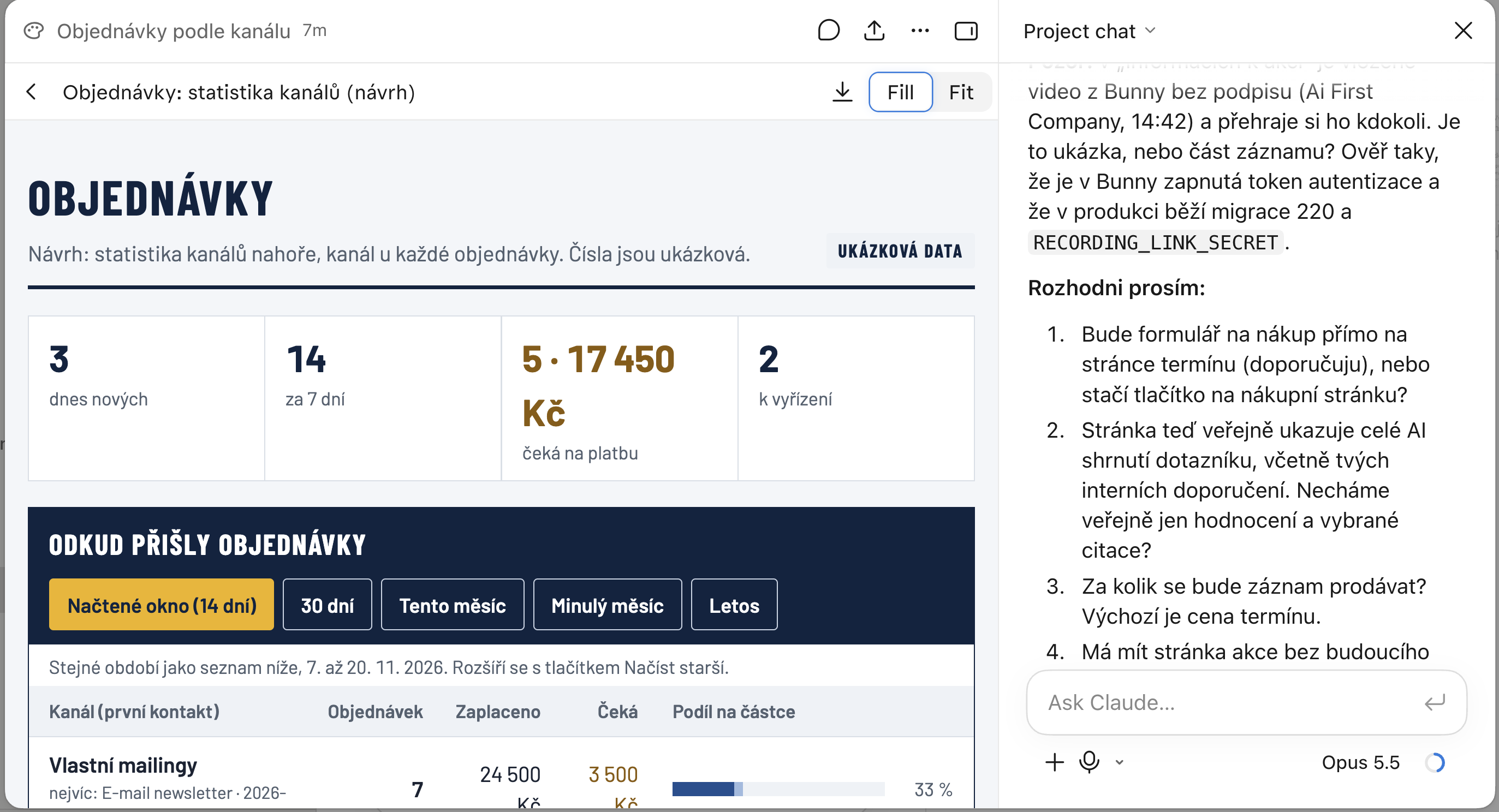
Here, for example, you can see an artifact where we’re designing an internal results dashboard for the promotion of our events, showing which source brought what. On the right side is a chat in which I discuss the detailed shape of this part of our intranet with Claude. And I can click on any part of the draft on the left and tell Claude what I think about it, how I want to change it, or ask it to explain it. It’s a great feature that you’ll quickly fall in love with. You can work similarly with a spreadsheet, a document, and other “artifacts.” If you don’t want the chat, you simply hide it and work with the document as in a simple editor. Don’t expect the advanced features of Google Docs, but you can handle basic formatting, and the real magic comes from the AI integration.
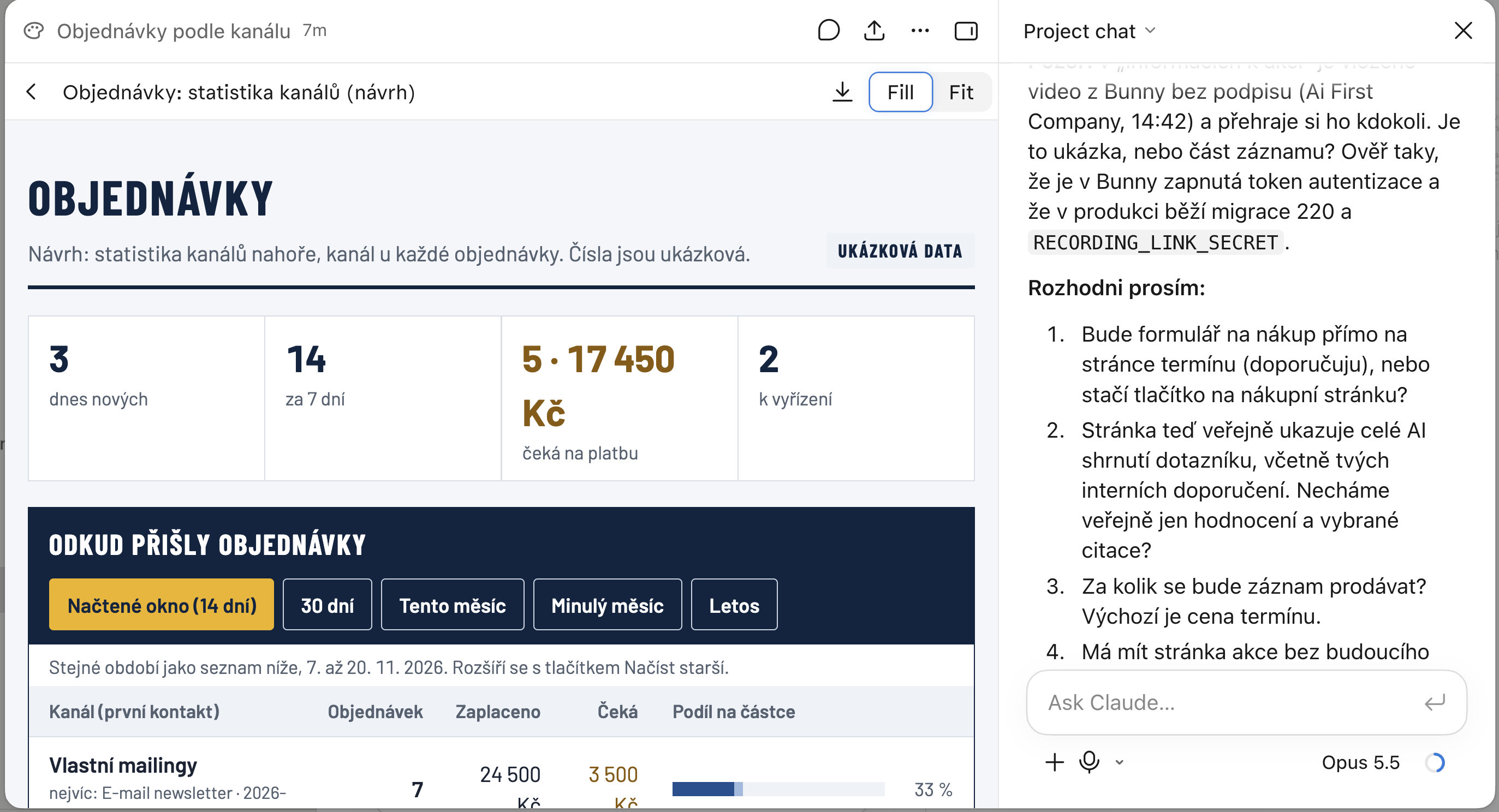
What matters: Claude supports embedding external services into Artifacts. The first such example is Gamma, a presentation suite, whose documents you can open in Claude. Because Gamma uses a trusted connection to Claude’s authorization authority, after the initial linking you’re always signed in to your account “in the background,” without having to wait for anything. Gamma is then integrated into the desktop app and you work with it just like with other artifacts. Likable, interesting, and I’m looking forward to more services being plugged in. We’ll cover it in more detail later.
Claude Meetings: a colleague who takes its own notes
This is probably the most visible and most promising novelty. Claude joins a Google Meet call as a visible participant and works while the others talk. It drafts the plan being debated, draws a timeline on the whiteboard, answers questions in the meeting chat, and pulls last year’s numbers, say, from connected company apps. After the call, you’ll find the minutes, tasks, and created materials in Claude.
Anthropic says its own people have had Claude in almost all meetings like this for roughly two months now. The beta launched on November 12 for the Team and Enterprise plans, in web Claude and in the desktop app.
The limitations are still significant. Only Google Meet works. Zoom and Microsoft Teams aren’t supported, and Anthropic only vaguely promises more platforms. For most Czech companies, which run on Teams, Meetings is therefore useless for now.
External guests kick it out. Claude announces itself as a participant and posts a notice in the chat. It won’t join a call with people outside the company unless an admin allows it, and if an external guest joins later, Claude leaves on its own. That’s a reasonable approach to privacy. But an agency or a consultant whose meetings are mostly with clients won’t get much out of Meetings for now.
And one more thing the announcement doesn’t address: in the Czech Republic, GDPR applies to recording and transcribing a meeting. A notice in the chat is the bare minimum. Anyone who rolls this out should have an internal rule on when to invite Claude to a meeting and who reviews the minutes.
Spreadsheets and whiteboards
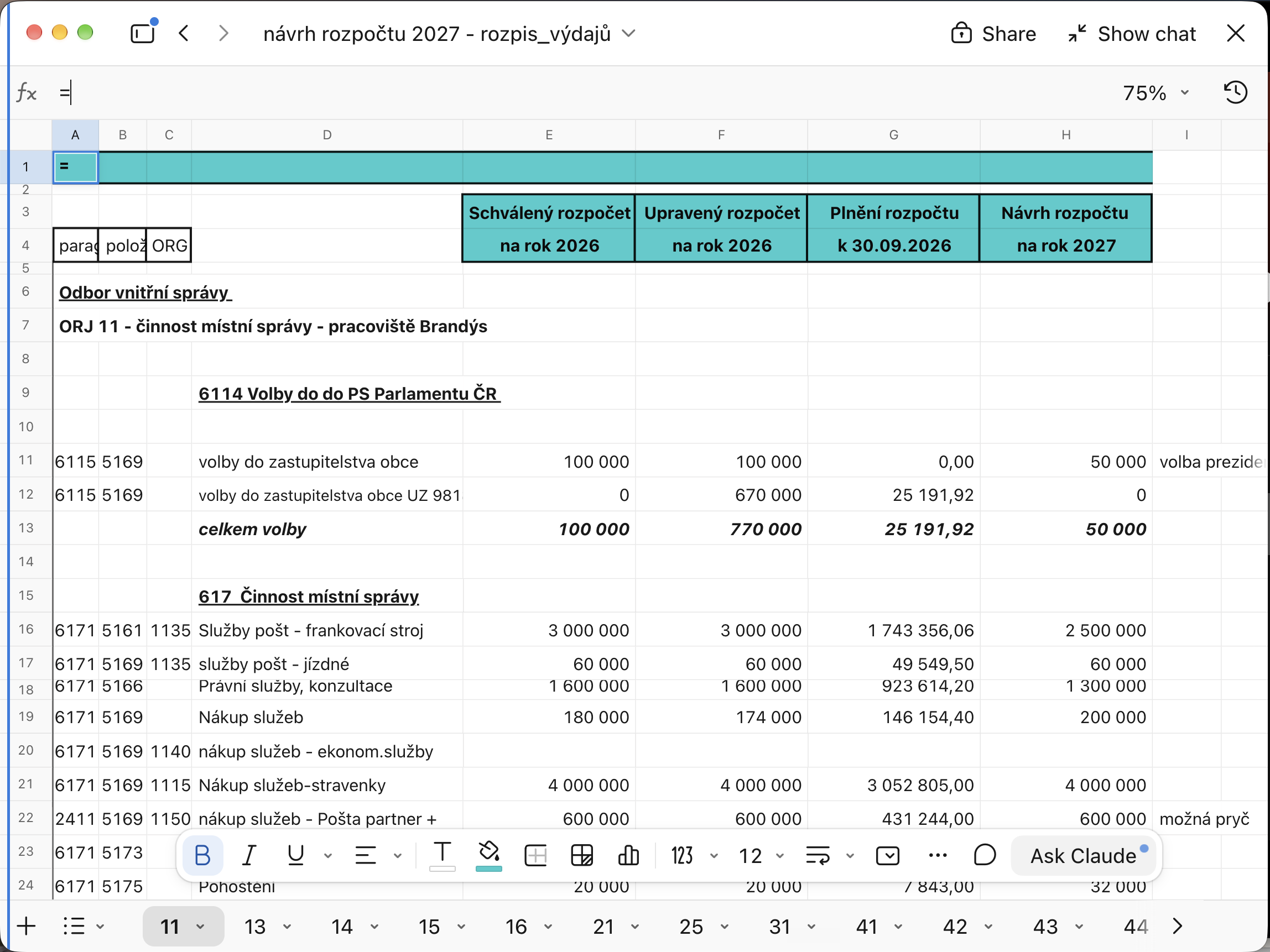
Claude Sheets are shared spreadsheets that a team builds together with Claude. They support multiple sheets, formulas, formatting, and dropdown menus. Claude writes directly into cells and describes every change it makes, so you can see where it touched things. Typical uses are campaign tracking or a hiring budget: Claude builds the skeleton, you fine-tune.
Anthropic itself admits that this is simple spreadsheet functionality for lighter work. For full-fledged Excel there is export to .xlsx or CSV. I appreciate the honesty. Anyone expecting an Excel replacement won’t get one, even though the feature supports it. The added value here is the AI, not pivot tables.
Claude Whiteboards are digital whiteboards for working through ideas. Claude groups ideas by topic, draws timelines, and assigns responsibilities. It converts a finished whiteboard into a document or presentation, or moves it to Lucid, Miro, or Vani from Zoho. And most importantly: the whiteboard fills up live during a meeting in Meetings, which is the most interesting connection in the whole suite. And it’s quite addictive to put it on the big screen during a meeting…
Both are in beta on all paid plans, on the web, in the desktop app, and on mobile. On the Team plan the tools are enabled right away; on Enterprise an admin has to turn them on.
Claude Data: dashboards over company data
October’s Dashboards were renamed Claude Data and graduated from beta. They connect to data warehouses and CRM systems such as Snowflake or Salesforce and build a dashboard with charts, a data story, or a short video with commentary from a question in plain language. Without a data connector, it doesn’t work.
In beta there’s an option to use definitions approved by the data team. This addresses the old problem where three departments have three different “revenue” numbers because each calculates it differently. Once the data team defines what an active customer or a margin is, Claude is supposed to stick to it. If this proves reliable, it’s more valuable for companies than the spreadsheets and whiteboards put together.
Partner apps directly in Claude
Interactive connectors (integrations with third-party services via the open MCP protocol, Model Context Protocol) have so far only shown a small live preview in the chat. Now the whole app opens next to the conversation or full screen, signed in under your account. Claude can edit the page, row, or file you have open in it, and you approve changes the same way as with a regular connector. You can pin the tools you use most to the sidebar.
Partners include Adobe, Atlassian (Jira, Confluence), HubSpot, Box, Notion, Asana, and Canva. Claude can, for example, edit a page in Confluence or rework a graphic in Adobe using company brand materials. Technically it’s built on MCP Apps, an open extension of the MCP protocol, so anyone can build the same thing.
On top of that come plugins with ready-made skills. A plugin is a package that adds, alongside the connection to a service, instructions on how to work with it. Salesforce (beta), NetSuite, and Workday (beta) cover sales call preparation, financial analysis, or a vacation request.
Czech manufacturing companies should also take note of the Claude for Manufacturing plugin from November 12, which connects Claude to Infor, NetSuite, Autodesk Fusion, and Microsoft 365.
What admins get in companies
Automatic connection (beta). An admin connects the company’s Notion, Atlassian, or Dropbox once, and employees are connected automatically on first use.
Connector permission restrictions. Claude can, for example, read Slack but isn’t allowed to send messages on your behalf. I consider this the most sensible item of the whole announcement. An agent with the right to write into company communications is exactly the kind of risk that gets AI banned in companies.
Spending limits, access control, encryption, and integration with more than 100 security tools (Splunk, CrowdStrike). Every cloud session runs in an isolated virtual machine. For companies with stricter requirements, Anthropic simultaneously launched in closed beta self-hosted Claude Managed Agents, where the entire agent service, including credentials and history, runs in the company’s own cloud or server room.
Numbers from customers
Anthropic supplemented the announcement with quotes. Advantage Solutions (an American marketing agency) reportedly cut preparation of a financial forecast from about 10 hours to under 30 minutes. HubSpot has a follow-up email draft ready within half an hour after a call. Anthropic’s legal department cut review of marketing materials from three days to 24 hours.
These are numbers from the vendor’s marketing text, with no methodology. They show what the tools can be used for. I wouldn’t take them as proof.
Is it for you?
Anthropic has stopped being “just” a chatbot with a good model. It has assembled an office suite and is pulling partner apps into it. The timing is probably not accidental: OpenAI introduced similar tools only a few weeks earlier, and Fortune placed the whole event in the context of preparations for Anthropic’s stock market debut. Both companies are aiming at Microsoft’s and Google’s most lucrative territory.
At the same time, Anthropic is playing both sides. Only on October 6 did it let Claude into Google Sheets as a sidebar, and five weeks later it has spreadsheets of its own. For partners like Adobe or Atlassian this is double-edged: they get access to Claude’s users, but someone else is slowly taking over their relationship with the customer.
My take: the strongest part is the integration. A meeting that directly fills a whiteboard, a whiteboard that becomes a spreadsheet, and a spreadsheet that becomes a dashboard: neither Excel, Teams, nor Miro offers that on its own. This is the “AI as a colleague” idea, and it makes sense to me.
For Czech companies, though, reality is more sober today. You can’t use Meetings on Teams or with a client on the call, Sheets is explicitly simple, and half the news is in beta. I recommend starting where a mistake costs nothing: internal meetings (if you’re on Google Meet), planning whiteboards, dashboards for your own use. Contracts, financial statements, and sensitive client data I’d move there only once it’s clear where exactly they live and how you get them back out.
Sources: Anthropic announcement from 11/10/2026, partner apps in Claude, release notes, Claude for Manufacturing, TechCrunch, The New Stack, Fortune. Status as of November 20, 2026; availability and the breakdown by plan change quickly.