
Anthropic has introduced a new feature called Dynamic Workflows in Claude Code, along with the Opus 4.8 model. It shows great promise. Work that would normally take months to plan can reportedly be completed in a matter of days. Claude writes its own orchestration script, which launches tens to hundreds of parallel subagents in a single session, and checks the results itself before delivering them to you. That sounds like a major leap forward. However, it’s worth distinguishing between what’s truly new, what’s just marketing, and what practice will ultimately reveal.
What Dynamic Workflows Are Supposed to Be
Dynamic Workflows are another attempt by Anthropic to offer a fresh perspective on the use of AI agents and thus the intensification of development work. That in itself means they aren’t a tool for everyone. They aren’t particularly suitable for hobbyists or developers who don’t yet know where their development will lead. On the other hand, they may be of interest to experienced developers who have a clear vision of what their application should look like.
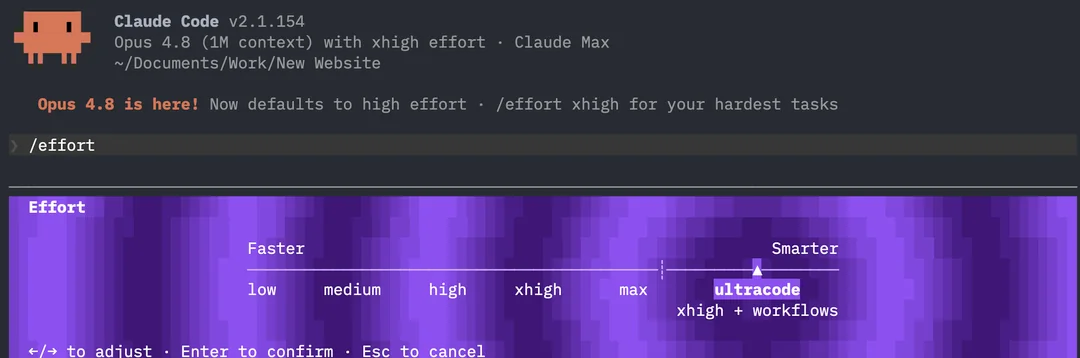
Dynamic Workflows are currently in the research preview phase. They require Claude Code version 2.1.154 or newer and run on all paid plans, including the API. The documentation also confirms this for the Pro plan, where the feature is enabled manually in /config under the “Dynamic Workflows” line. For most Czech solo developers on the Pro plan, this is the key information.
There are two ways to run a workflow. Either use the word “workflow” in the prompt, and Claude will write a script for your task, or set /effort to the new value ultracode—in which case Claude decides on its own when to deploy a workflow for the task and sets the effort level to xhigh. With ultracode, however, caution is advised: it is the most expensive effort level, turns virtually every prompt into a workflow, and bypasses a number of confirmations, so costs rise quickly. For getting a feel for the feature, it’s a rather poor first choice.
How it works technically
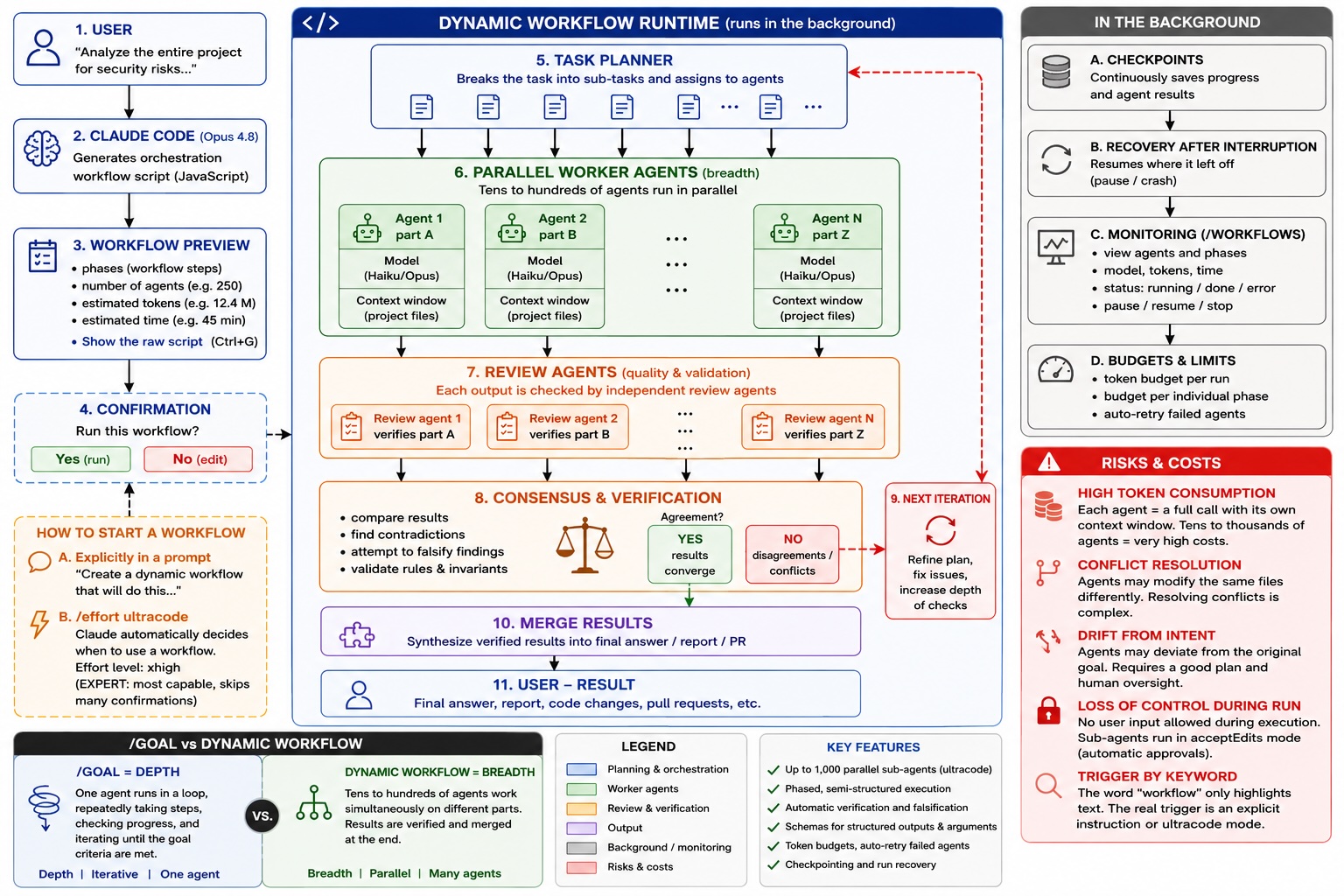
Dynamic workflow is, at its core, a JavaScript script that orchestrates subagents on a large scale. Claude writes it for the task you describe, and the runtime runs it in the background while your session remains responsive.
Once the run starts, Claude breaks the task down into subtasks and distributes the work among parallel agents. The results are verified before the next iteration begins. Some agents tackle the problem from independent angles, while others attempt to refute their findings, and the process iterates until the answers converge. Progress is saved continuously, so an interrupted run resumes where it left off. Coordination takes place outside the conversation, which is designed to keep the process on track even for large tasks.
How does this differ from the standard team of subagents that Claude Code was capable of before? According to the Anthropic development team, in two ways: support for one to two orders of magnitude more agents, and a phased, semi-structured process where work proceeds in steps. And it can be quite a ride. With the ultracode setting, a run can launch up to 1,000 parallel subagents. Schemas are also available for structured outputs, argument passing, token budgets, and automatic retries for failed agents. Your tokens will be flying off the shelves.
Important info for anyone who wants to keep the process under control: Before running, Claude Code displays the planned workflow with phases, number of agents, total tokens, and elapsed time, and offers the option to view the generated orchestration script via “Show the raw script.” So you don’t have to run the code blindly—you can read what’s about to run and cancel the run if the scope was too broad. In auto mode, however, the confirmation only appears on the first run of a given workflow, and via claude -p or the Agent SDK, confirmation is disabled entirely. It’s worth knowing this before you run the function in automation, because it’s probably better to get a feel for the whole thing before you run it automatically.
Where workflows fit among other tools
Before you start deciding whether to use workflows, it’s worth placing them at the top and most expensive tier of the hierarchy that Claude Code offers. From bottom to top: simply ask Claude, create a reusable Skill, delegate a task to a Subagent running in parallel with your session, assemble an Agent Team where agents communicate with each other, deploy /goal for a task repeated in a loop, and finally, a Dynamic Workflow for massive parallel processing. Each higher level adds complexity, performance, cost, and risk. And it’s worth noting that if you haven’t mastered the previous level, moving on to the next one will likely be overkill for your work.
The key distinction for us is between /goal and workflow, as they are easily confused.
/goal is depth: a single agent that can launch others, runs in a loop, and repeatedly checks whether the task is complete until it meets the specified criteria.
Workflow is breadth: dozens of agents running simultaneously side by side, each on their own part, with results merged at the end. They don’t race toward a finish line; they execute the plan set at the beginning and return the result. This leads to a practical guideline: if a task breaks down into many pieces that can run independently and simultaneously (reviewing every file in a project, migrating hundreds of files, high-risk work where you want maximum computation for each piece), a workflow is the right choice. For individual edits, quick queries, and routine knowledge work, opt for a lower level.
The One Big Proof—and Why to Be Skeptical of It
Skip this if you’re not interested in dissecting marketing claims.
The main reference example cited by Anthropic is the recent rewrite of the Bun runtime. Jarred Sumner used Dynamic Workflows to port Bun from Zyg, resulting in roughly 750,000 lines of Rust code; 99.8% of the original test suite passed, and the process took eleven days from the first commit to the merge. One workflow mapped the correct Rust lifetime for each array in the original code, another wrote each file as a behaviorally identical port, with hundreds of agents working in parallel alongside two reviewers on each file. That sounds like a smashing success. But when we dig into the details, we see it’s not that simple.
First, this is a mechanical refactor. Critics in the community point out that agents can handle mechanical refactors relatively easily even without the new feature, so Bun doesn’t prove that workflows add anything extra. Second, the port is running in canary mode and hasn’t gone into production yet—Anthropic itself states this in the text. Third, and this is the most serious point: the PR has 6,755 commits, and according to available analyses, not a single line was written by a human. The reviewer list speaks for itself—it was approved by bots, while the sole human reviewer didn’t even have time to glance at the pull request. The code was written by Claude, reviewed by Claude. This gives rise to criticism that has been repeated since the release: no human has read the entire codebase, which makes it a black box for administrators, the true cost of which will only become apparent when debugging some future serious incident. Sumner himself admittedthat the Rust compiler does not address memory issues at JavaScript-Rust boundaries and still relies on human oversight.
The Canary build is a nightly, experimental build from the current state of the main branch, which you install with the command bun upgrade --canary. It is not the numbered version that a regular user receives; it is the bleeding edge for those who want to test the latest changes and report bugs. The name Canary refers to test parrots…
There is one more caveat regarding test compatibility. Allegations have surfaced that some tests were modified so that the Rust version would pass them, and that bugs are emerging that were not present in the original Zig version. The 99.8% figure therefore doesn’t mean as much as it promises at first glance—the test suite verifies known behavior on known paths, not robustness in edge cases, behavior under load, or concurrency.
Bun is therefore more of a demonstration of courage and scale than proof of reliability. As the sole major reference case for the new feature, it’s a weaker foundation than marketing makes it out to be.
The main controversy: a tool, or a way to burn more tokens?
This is the core of the debate that erupted under the announcement. The dominant reaction from skeptics is that this is tokenmaxxing disguised as a product—that is, a way to get users to consume far more tokens without even noticing.
This is the basis for a second, more substantive objection. The top-rated comment under the announcement states that the bottleneck today isn’t how fast Claude processes the code, but whether it performs the task correctly. Developers need mechanisms for managing long runs and applying corrections on the fly rather than a faster way to burn tokens with no guarantee of the outcome. All it takes is one small misstep in the plan, and fifty agents confidently build upon a delusional assumption. The planner must therefore be more conservative than the working agents, not smarter.
How big is that price difference in reality? Anthropic itself reports that with typical use of Claude Code, 90% of users stay under $30 per active day, and the average is around $13 per developer per day. Dynamic workflows, however, are a different category. The most illustrative example is the experience of one content creator who tested the feature for a week: a single prompt consumed half of his $200 monthly plan in roughly thirty minutes. The cause is instructive—he let the workflow scan his entire desktop, so the agents went through every local file and repository. An unrestricted prompt equals a burning budget and consumption. Another of his runs, an audit of forty-one of his own configuration packages, consumed roughly five million input tokens because he launched forty-one agents at once, each with its own context window that someone has to load. That is the essence of the cost: each agent is a full Claude call with its own window, and running just a few of them is enough to send the bill skyrocketing. This is a single experience, not a measurement, but the trend confirms Anthropic’s own warning: a single careless run can consume many times what you would spend in a full day of normal work.
For balance, it’s necessary to present the other side. Boris Cherny from the Claude Code team listed what he’s actually used the feature for internally over the past few weeks: he autonomously delivered over 20 optimizations reducing Claude Code’s token cost by about 15%, ported tree-sitter, color-diff, yoga-layout, and other modules to TypeScript with CPU and memory improvements ranging from two to ten times, sped up CI, and repeatedly hunted down and fixed flaky tests, reduced Claude Agent SDK startup time by 61%, and contributed 69 PRs simplifying the code by removing over ten thousand lines. These are concrete, verifiable examples, and it’s fair to hold them up against blanket skepticism. The difference between token-maxing and useful work clearly won’t lie in the function itself, but in what task you use it for and how you deploy it.
Ultimately, the usability of Dynamic Workflows will depend on how Anthropic manages to balance the benefit (i.e., the result) and the volume of tokens consumed (i.e., the cost). That is why I am actually mentioning this debate; in reality, it is nothing more than a matter of costs versus benefits.
Real risks that marketing does not address
From the reactions so far, four issues stand out that the announcement is silent on.
Conflict resolution. Launching agents is the easy part. The hard part is resolving a situation where two of them access the same file and disagree on the fix. This is repeatedly mentioned by people who have been building similar things manually for months, and it’s not yet clear how the new feature handles this.
Drift from the intended behavior. For anything larger than a small component, agents drift away from what was intended. Time is then spent on suspicious checks of the output to see if the agent has sneaked in a change or violated an invariant. A concrete example is provided by a post-launch report: one developer described a session where Claude attempted to run 47 concurrent agents, successfully started 25 of them, and during a five-hour run made errors that had to be caught by a human. The point is not that the feature is broken, but that parallel orchestration in the research preview phase still requires active supervision. More parallel agents tend to multiply this problem rather than solve it.
Loss of control over execution. Here, the reality is even harsher than the marketing suggests. Off-conversation coordination is sold as a feature, but according to the official description, no user input is allowed during execution—the only thing that can pause the workflow are agents’ requests for permission to execute commands outside the allowlist. So you can’t intervene in the run and redirect it; you can only stop it entirely. Additionally, subagents within the workflow always operate in acceptEdits mode and automatically approve file changes, regardless of how restrictive the permission settings are for the session itself. Users accustomed to approving every change do not have this safeguard within the workflow.
Triggering via keyword. The feature responds to the word “workflow” in the text. It’s important to clarify exactly how this works, as the initial wave of complaints misunderstood it. Simply typing the word “workflow” will only highlight the text and trigger nothing—a truly reliable trigger is an explicit phrase like “build me a dynamic workflow that does this.” The pitfall, then, isn’t so much in a single word as it is in the ultracodemode, which turns practically every prompt into a workflow. Nevertheless, anyone with MD files or conversations full of the word “workflow” in their project will encounter highlighting where they least expect it, and there have been repeated calls for an explicit /workflowcommand instead of a keyword response.
Is it worth it for a typical vibecoding project?
Short answer: usually not. And it’s worth saying this upfront, rather than pushing a guide on the reader about how to spend tokens on a feature they don’t need.
Dynamic workflows solve a problem that small projects don’t have. Anthropic builds them for tasks too large for a single agent’s one or several runs—debugging across an entire service, a migration affecting hundreds of files, a plan vetted from every angle. A typical Vibecoding project is a landing page, a small app on Astra, a few Workers on Cloudflare. There, the bottleneck is your decision-making about what you actually want and how to render it, not the number of agents that can be parallelized. Add to that the cost: Anthropic itself warns that the feature consumes significantly more tokens than a regular session and recommends starting with a well-defined task. Let’s recall the figure from the previous section—one user burned through half of a $200 plan with a single poorly defined prompt in half an hour. On the Pro plan, where the limit is lower, similar carelessness will eat up your daily allowance even faster.
However, there are three situations where even a solo Vibecoder will find the feature useful.
The first is a security and quality audit of a finished project. When you have a project built and want to test it before deployment, parallel agents with independent verification of findings make sense. The documentation directly offers an example: check every API endpoint under src/routes/ for missing authentication checks. A single pass would overlook such things; a set of agents would not.
The second is a larger one-time migration. Switching to a new framework version, replacing a library across the project, porting between languages. In other words, exactly the kind of mechanical tasks that even skeptics acknowledge agents can handle.
The third is code cleanup. Searching for dead code and simplifying a project that has ballooned over a few months. The Claude Code team has also demonstrated that this works on their own codebase.
Here, I requested a security audit of the kurzy.vibecoding.cz project—which is publicly available on GitHub as a template for our video courses.
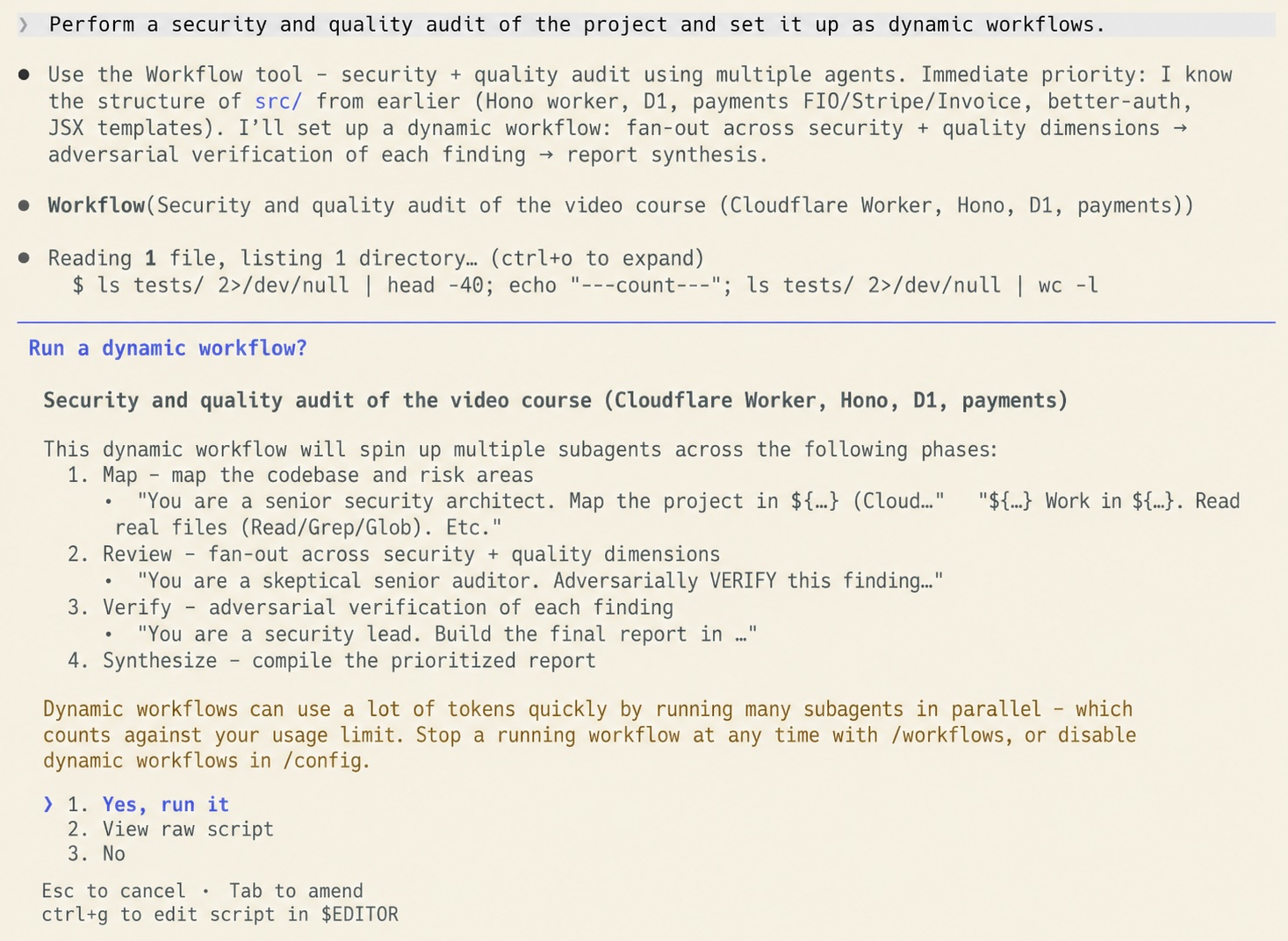
And this is what the Review and Verify overview looks like for each agent.

Practical steps for the Pro plan
- Update Claude Code to version 2.1.154 or newer.
- Enable the feature in
/configunder the Dynamic workflows section—it’s disabled by default on the Pro plan. - The safest first test is the built-in workflow
/deep-research. It spreads the search across multiple angles, finds sources, verifies claims against each other, and returns a single report with citations. Choose a narrow question so you can see resource usage and behavior before running something large. - To calibrate your budget on a real task, enter something narrowly defined that only reports and makes no changes—for example, a workflow that checks only the
auth/middleware/directory for race conditions and lists the findings without modifying the code. Once you see how the workflow breaks down the task and how many agents it launches, you have a calibration point for larger jobs. - If the job doesn’t require full performance, tell Claude to run the worker agents on the Haiku model. Each agent is a full invocation with its own context, so a cheaper model across dozens of agents means a significantly lower bill.
- Before confirming the run, use the preview—Claude Code will show the phases, number of agents, and total tokens, and in the confirmation dialog, it will offer the option “Show the raw script” (press Ctrl+G to open the script in the editor). Don’t skip this step—it’s your safeguard against unexpected token charges and against the workflow accessing areas it shouldn’t. If the prompt is too broad, select “No” and narrow it down.
- You start a full run with an explicit statement like “build me a dynamic workflow that…”. Simply typing the word “workflow” in the text won’t start the run; it will just highlight it.
- You can monitor the run in the
/workflowsview—it shows each agent, the model it’s running on, token consumption, and time, and you can also stop it from there. To resume a paused run, select it and pressp- agents that have already finished will return their saved results, and the rest will finish calculating. The process is saved continuously, so an interrupted run continues where it left off. - If the workflow proves useful and you plan to repeat it, save the script for that run as a custom command. But be careful where it’s saved: by default, it may end up in the global Claude Code working directory, not in your project. If you want it in your project, explicitly tell Claude to save the file to
.claude/workflows/in the project. In subsequent sessions, you can then run it as/<name>.
Conclusion
Dynamic workflows are an interesting concept. The most profound change is that the decision regarding orchestration shifts from the developer to the model—previously, you wrote the logic for task distribution in slash commands, prompt templates, or subagent files; now, you write the request and Claude handles the orchestration. Your work moves up a level: instead of breaking down the task, you formulate success criteria, constraints, and trust boundaries. As a thesis, it’s worth watching. As a proven practice, it doesn’t exist yet. The only major case study is controversial; early users are reporting bugs and token charges, and the strongest reservation—that speed isn’t the bottleneck, but accuracy is—remains unaddressed. Moreover, a week after release, there is still not a single independent measurement, just marketing and first impressions. The feature is explicitly labeled as a research preview, and that’s how it’s worth approaching it: cautiously, on small, limited tasks, keeping an eye on resource consumption, and without expecting miracles.
For typical Vibecoder tasks, where you don’t know exactly what you’re implementing and are straddling the line between research and coding, I wouldn’t use Dynamic Workflows; it’s unnecessarily demanding in terms of planning the task and results in a loss of ongoing control over the workflow.